The ChiCLI command line for the Commodore 64 reimagines what this classic computer can do. Developed by Chiron Bramberger, ChiCLI (pronounced “ky see-elle-eye”) turns the C64 into a full-featured command line system inspired by AmigaDOS, MS-DOS, and Linux.
For many retro enthusiasts, the thought of typing system commands directly on a C64 feels like wishful thinking. But ChiCLI makes it happen, fast, intuitive, and with surprising depth. It’s both a nostalgic throwback and a modern convenience for those who love to work close to the metal.
What Makes ChiCLI Different
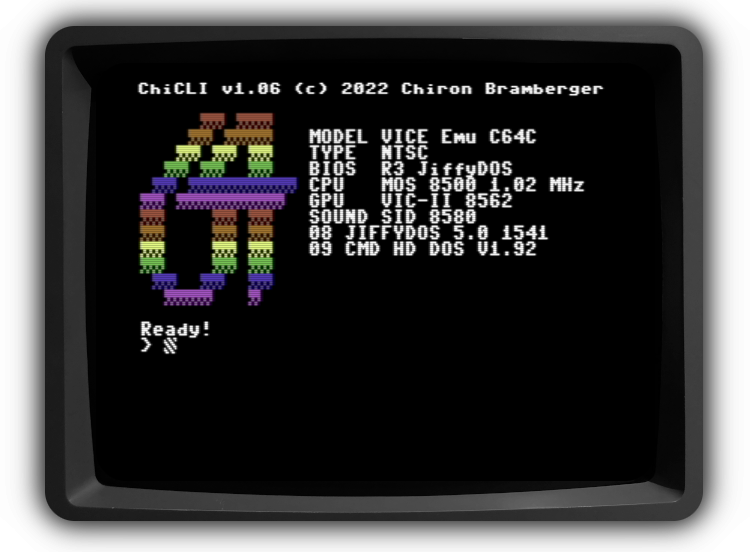
At startup, ChiCLI immediately displays a full system overview of the Commodore 64, setting the stage for a more technical experience. From there, users can manage drives, directories, and disk images as easily as they would on a modern computer.
The interface supports common file operations like rename, copy, delete, and format, but it goes much further. Users can copy entire disks with a single wildcard command, mount and extract D64 disk images, and even access partitions on supported devices. For anyone using SD2IEC or EasyFlash 3 hardware, it offers deep integration with device controls and configuration options.
It doesn’t stop at file management. ChiCLI can peek and poke memory, dump ROMs, view memory ranges, and execute system calls. With built-in math conversions, stopwatch functionality, and a help system for every command, it feels like a fusion of productivity and curiosity – all running within the humble 8-bit environment of a Commodore 64.
Community Reactions
Retro computing forums have been lighting up with praise for ChiCLI. One enthusiastic user summed it up perfectly:
“Your program completes me. I think I may even make my C64 boot directly to it… I have never seen anything this slick!”
Another user commented,
“I smiled when I did ls.”
From Reddit to Facebook, C64 fans describe ChiCLI as a “must-have” tool that “raises the bar substantially.” Others compare its performance favorably to MS-DOS and applaud its ability to mount disk images and manipulate partitions, tasks that were once cumbersome on the platform.
This level of praise isn’t common in the Commodore scene, where software updates often focus on minor tweaks or nostalgic recreations. ChiCLI stands out by giving the C64 something entirely practical: control, speed, and efficiency in a text-driven interface.
Compatibility Across Systems
ChiCLI has been tested on a wide range of hardware configurations, including classic NTSC boards such as 250407 and 250469, the SX-64, and even TheC64 Mini. It performs equally well under VICE emulation and supports peripherals like the SD2IEC, EasyFlash 3, IDE64, and Ultimate 64.
Advanced users have reported smooth operation with hardware expansions such as CMD HD, FD-2000, and Pi1541 drives. It’s even compatible with exotic setups like IEEE-488 BusCardII systems and the Commodore Flyer Internet Modem.
ChiCLI’s versatility reflects thoughtful engineering. The software has been stress-tested with everything from JiffyDOS and Super Snapshot to virtual IEC devices under emulation. It’s rare to see such wide support in a C64 utility, and that broad compatibility is a large part of its growing appeal.
Customizable and Practical
Beyond its technical capabilities, ChiCLI is designed to feel personal. Users can set color profiles, create aliases and hotkeys, and even configure a screen saver that displays the current time or date. The interface supports quick access to Turbo Macro Pro via a built-in shortcut, making development workflows smoother.
For those who love exploring memory, ChiCLI provides a real-time peek-and-poke system. The results can be saved as files, making it ideal for debugging or learning how the C64 organizes its resources. Its math functions convert values between decimal, hexadecimal, and binary, while the stopwatch tool, accessible with a simple F5 tap, brings some modern convenience into the mix.
Developer Notes and Open Source Spirit
Chiron Bramberger developed ChiCLI in Canada using the cc65 compiler suite. The project remains open for users who want to build it themselves, and the GitHub page includes compilation scripts for Linux and macOS.
The software’s latest release, version 1.06, fixes a temperature display bug and continues the developer’s steady improvement cycle. While ChiCLI is distributed without warranty, it’s clear that it was made with care and enthusiasm for the Commodore community.
A Fresh Way to Use the C64
What makes the ChiCLI command line so compelling is its blend of nostalgia and functionality. It gives users the kind of command-driven control once reserved for PCs, all on the 8-bit computer that started it all. Whether used for file transfers, disk management, or programming support, it feels like a natural extension of the C64’s capabilities.
For those who have grown used to graphical loaders or menu-based file managers, ChiCLI offers something more direct, a true command interface that brings a sense of precision and immediacy to the Commodore experience.
You can download the disk image and supporting text files directly from the project’s GitHub page. Pair it with your favorite SD2IEC or Ultimate 64 setup, and your Commodore will feel both nostalgic and surprisingly modern.
Final Thoughts
ChiCLI isn’t just a clever experiment. It’s a practical tool that redefines what the Commodore 64 can do in 2025. Its flexibility, speed, and thoughtful design make it one of the most impressive utilities to arrive for the platform in years.
For retro fans and tinkerers alike, it’s worth watching the accompanying video demonstration to see just how powerful the Commodore 64 becomes once it boots into ChiCLI.